Spreadsheet template
Driver CPC expiry tracker.
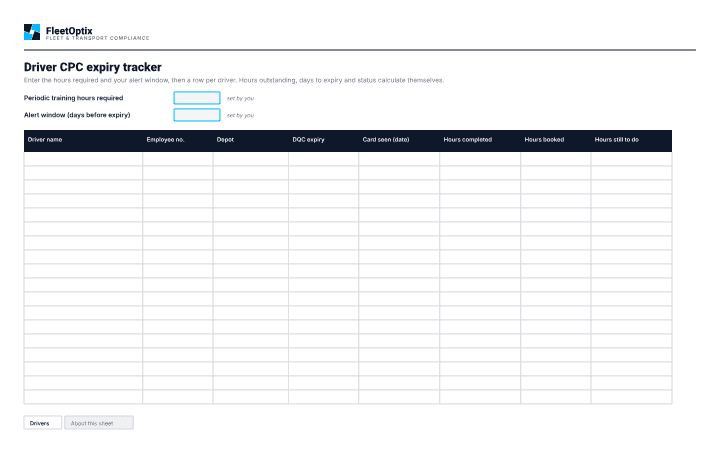
A spreadsheet for tracking Driver CPC hours and expiry dates across a fleet, so qualifications are renewed before they lapse rather than after.
This is the spreadsheet you keep yourself. FleetOptix does the same job against live records, and raises the alert without anyone opening a file.
What is on the sheet
- A row per driver, with DQC expiry and the date the card was last seen
- Training booked and training completed, in separate columns
- Hours still to do and hours still to book, calculated apart from each other
- A status of Expired, Due soon or In date, against an alert window you set
Why this record matters
A lapsed CPC does not stop a driver holding a licence, which is what makes it easy to miss — the entitlement looks intact right up until the driver is not legally able to drive professionally. Tracking it is an administrative job with a hard deadline attached.
Periodic training is accumulated over a cycle rather than taken in one sitting, which is why booked and completed hours are kept in different columns and counted separately. Training that is booked has not been done, and a tracker that adds the two together will report a driver as covered while they are still short.
The hours figure and the length of the cycle are set by the Driver CPC rules rather than by this sheet, so the spreadsheet asks for them once and calculates from there. A fleet that only watches the expiry date finds out too late to act.
Use it with
- Driver licence check formA form for recording driver licence checks — what was checked, what it showed, who checked it and when the next check falls due.
- New driver induction checklistAn induction checklist for new drivers, covering the documents to see, the briefings to give and the records that prove both happened.
Read more on this
© 2026 FleetOptix. Free to print, copy and use in your business. Not for resale. Please keep this notice.
Contains public sector information licensed under the Open Government Licence v3.0. General guidance, not legal advice. Checked October 2026.